Python Exercises:
Python String Exercises
Python List Exercises
Python Library Exercises
Python Sets Exercises
Python Array Exercises
Python Condition Statement Exercises
Python Lambda Exercises
Python Function Exercises
Python File Input Output Exercises
Python Tkinter Exercises
Numpy Exercises:
Numpy String Exercises
Numpy Integer Exercises
Numpy Array Exercises
Numpy Data Analysis Exercises
Numpy Data Sorting Exercises
Pandas Exercises:
Pandas Series Exercises
Other Tutorials:
Programming Languages Introduction
Python Introduction
Python Installation - Windows
Python Installation - Linux (Ubuntu)
Python Installation - Mac OS
Integrated Development Environment - IDE
Python - Basic Variables
Python - Sequence Introduction
Python - Output Formatting
Python - Escape Character
Python - Type Conversion
Python - Numbers
Python – Arithmetic Operators
Python – Assignment Operators
Python – Comparison Operators
Python – Logical Operators
Python – Ternary Operators
Python – Precedence and Associativity Operators
Python – Bytes Type and Usage
Python – Long & Raw Strings
Python – Concatenate Function
Python – Slice Function
Python – Length and Split Function
Python – Join and Count Function
Python – Find Function
Python – Index Function
Python – Alignment Function
Python – Startswith and Endswith Function
Python – String Case Conversion
Python – Remove Specified Character
Python – Encode and Decode Function
Python – dir and help Function
Python – Input Output Introduction
Python – Basic Operation
Python – Open Function
Python – Read Function
Python – Readline Function
Python – Write Function
Python – Close Function
Python – Seek and Tell Function
Python – Pickle Module
Python - File Input Module and Linecache Module
Python - Pathlib Module
Python - os.path Module
Python - fnmatch Module
Python - Tuple Introduction
Python - List Introduction
Python - List Add Element
Python - List Delete Element
Python - List Modification Element
Python - List Find Element
Python - Dictionary Introduction
Python - Dictionary Basic Operation
Python - Dictionary Method Guide
Python - Set Collection
Python - Set Basic Operation
Python - Set Basic Method
Python - Frozenset Method
Python - If Condition I
Python - If Condition II
Python - While loop
Python - For loop
Python - Pass Statement
Python - Break Statement
Python - Zip Reverse Function
Python - Function Introduction
Python - Positional Parameters
Python - Key Arguments
Python - None and Return
Python - Variable Scope
Python - Local Function
Python - Closure Method
Python - Lamdba Expression


Answer for Python Tkinter Exercise 5
5. Write a python Tkinter program to create a window with title Tkinter Exercise 5 and create a click button in the tkinter window.
The output is:
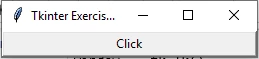
Sample Answer:
import tkinter as tk
window = tk.Tk()
window.title('Tkinter Exercise 5')
my_button = tk.Button(window, text='Click', height=1, width=35, command=window.destroy)
my_button.pack()
window.mainloop()
More Exercises:
Python String ExercisesPython List Exercises
Python Library Exercises
Python Sets Exercises
Python Array Exercises
Python Condition Statement Exercises
Python Lambda Exercises
Python Function Exercises
Python File Input Output Exercises
Python Tkinter Exercises
More Numpy Exercises:
Numpy String ExercisesNumpy Integer Exercises
Numpy Array Exercises
Numpy Data Analysis Exercises
Numpy Data Sorting Exercises
More Pandas Exercises:
Pandas Series ExercisesMore Tutorials:
Python Installation - Linux (Ubuntu)Python Installation - Mac OS
Integrated Development Environment - IDE
Python - Basic Variables
Python - Sequence Introduction
Python - Output Formatting
Python - Escape Character
Python - Type Conversion
Python - Numbers
Python – Arithmetic Operators
Python – Assignment Operators
Python – Comparison Operators
Python – Logical Operators
Python – Precedence and Associativity Operators
Python – Bytes Type and Usage
Python – Long & Raw Strings
Python – Concatenate Function
Python – Slice Function
Python – Length and Split Function
Python – Join and Count Function
Python – Find Function
Python – Index Function
Python – Alignment Function
Python – Startswith and Endswith Function
Python – String Case Conversion
Python – Remove Specified Character
Python – Encode and Decode Function
Python – dir and help Function
Python – Input Output Introduction
Python – Basic Operation
Python – Open Function
Python – Read Function
Python – Readline Function
Python – Write Function
Python – Close Function
Python – Seek and Tell Function
Python – Pickle Module
Python - File Input Module and Linecache Module
Python - Pathlib Module
Python - Pathlib Module
Python - os.path Module
Python - fnmatch Module
Python - Tuple Introduction
Python - List Introduction
Python - List Add Element
Python - List Delete Element
Python - List Modification Element
Python - List Find Element
Python - Dictionary Introduction
Python - Dictionary Basic Operation
Python - Dictionary Method Guide
Python - Set Collection
Python - Set Basic Operation
Python - Set Basic Method
Python - Frozenset Method
Python - If Condition I
Python - If Condition II
Python - While loop
Python - For loop
Python - Pass Statement
Python - Break Statement
Python - Zip Reverse Function
Python - Function Introduction
Python - Positional Parameters
Python - Key Arguments
Python - None and Return
Python - Variable Scope
Python - Local Function
Python - Closure Method
Python - Lamdba Expression